Delta Flow Profile
 By LuxAlgoAug 13, 2024
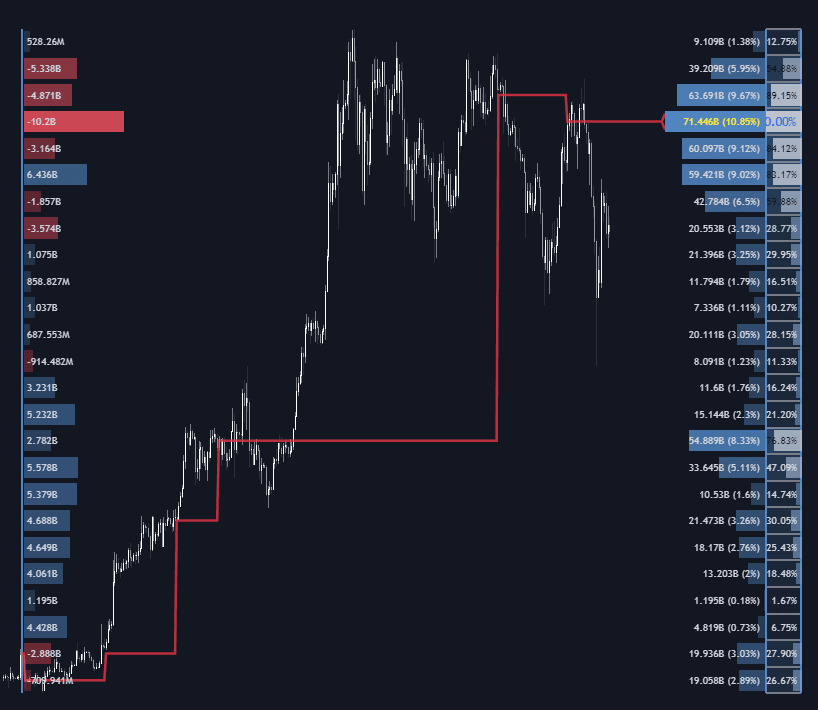
The Delta Flow Profile answers two questions at every price level: how much business was done there, and who was in charge while it happened. The sentiment half is a delta profile, net buying versus selling pressure per row, while the Money Flow Profile half accumulates total activity, with an optional normalized display scoring each row as a percentage of the peak level (100% marks the heaviest money flow). Together they reveal the prices where markets genuinely transacted and the side that dominated.
How to Trade the Delta Flow Profile?
- High money-flow rows: zones of concentrated activity often act as support or resistance, natural benchmarks for future tests.
- Delta dominance: rows with a pronounced volume delta imbalance show which side controlled that price; on a revisit, the dominant side may reinforce its orders there, pressing price in the prevailing direction.
- Level of Significance: follow the heaviest zone as a Developing line, a single Level, or a full Row: the reference market participants are most likely to defend or target.
Profiles compute over a lookback length or a fixed range, so the analysis can anchor to a session, a swing, or any window that matters to your strategy.
Delta Flow Profile Settings
- Money Flow Profile / Normalized / Sentiment Profile: toggle each histogram, including the percentage-normalized comparison view.
- Polarity Method: Bar Polarity infers delta from candle sentiment; Bar Buying/Selling Pressure uses high/low data for higher precision.
- Level of Significance: show or hide the significant level and choose its display method.
- Lookback Length / Fixed Range: the analysis window.
- Number of Rows: histogram resolution for each profile.
- Display: profile width percentage, horizontal offset, text and currency labels, and price-level visibility.
Frequently Asked Questions
Free indicator
Get free access to this indicator on the platforms below.

The Library is free. Quant makes it yours.
Pull any concept or indicator into Quant: rebuild it, retune it, or turn it into a backtested strategy of your own.