Gann Square of 9 Vibration Levels
 By LuxAlgoFeb 16, 2026
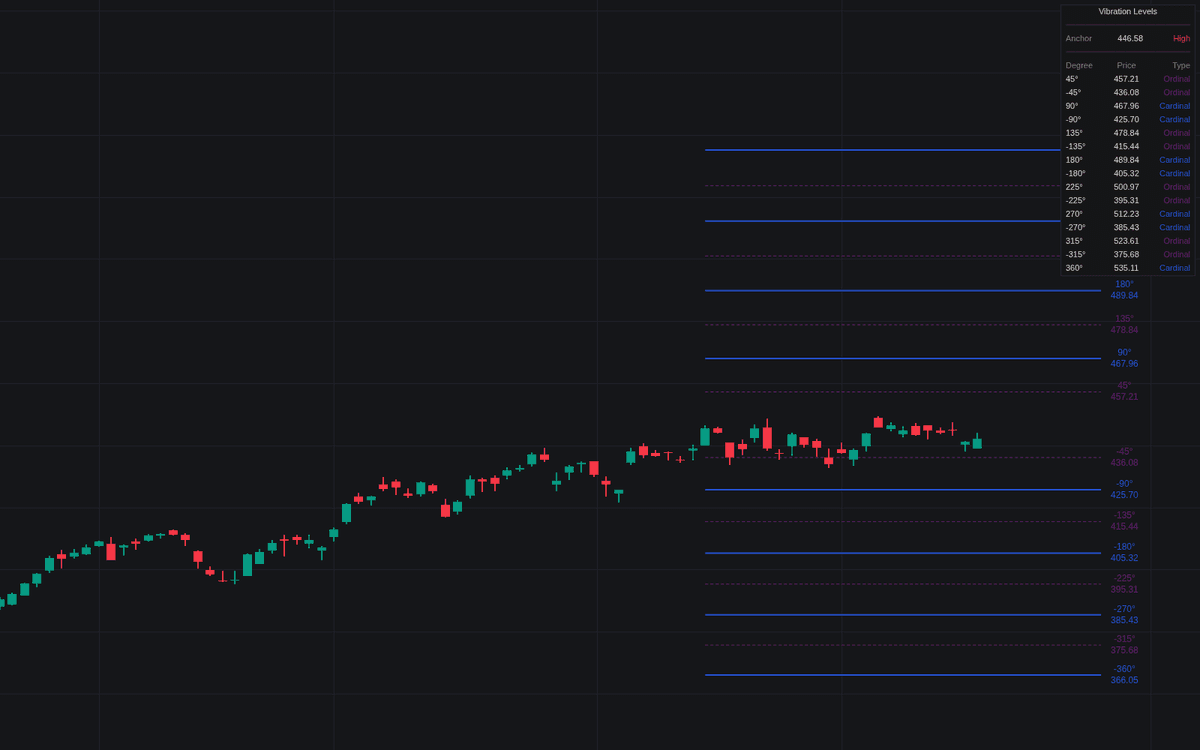

The Gann Square of 9 Vibration Levels indicator projects Gann Square-of-9 levels (support and resistance derived from angular steps around Gann's wheel) outward from a chosen anchor. Each level comes from the classic square-root transform, Price = (sqrt(Anchor) + Degree/180 × Direction)^2, so spacing expands geometrically instead of arbitrarily.
How to Trade the Gann Square of 9 Vibration Levels?
- Cardinal levels (90°, 180°, 270°, 360°): drawn as solid lines; traditionally the strongest vibration points, used for primary reversal zones and take-profit targets.
- Ordinal levels (45°, 135°, 225°, 315°): drawn as dashed lines; intermediate reaction zones suited to scaling in and out or tighter intraday targets.
- Auto Pivot anchoring: a new swing low projects levels upward, a new swing high projects them downward, keeping the map aligned with current structure.
- Manual anchoring: center the square on a price you consider significant, such as a major swing, a yearly or monthly open, or a breakout level.
The underlying Square of 9 treats prices sharing an angle on the wheel as related, which is why reactions are watched at these specific rotations. A real-time dashboard lists the active anchor, the degree levels in play, and their exact projected prices, keeping the chart itself clean.
Gann Square of 9 Vibration Levels Settings
- Anchor Type: switch between dynamic Auto Pivot detection and a fixed Manual anchor.
- Manual Anchor Price: the center point used in Manual mode.
- Pivot Lookback: bars used to detect swings in Auto mode. Shorter for reactive levels, longer for structural ones.
- Vibration Direction: project levels up, down, or in both directions.
- Show Cardinal Levels (90°) / Show Ordinal Levels (45°) / Show Level Labels: display toggles, alongside dashboard position and size controls.
Frequently Asked Questions
Free indicator
Get free access to this indicator on the platforms below.

The Library is free. Quant makes it yours.
Pull any concept or indicator into Quant: rebuild it, retune it, or turn it into a backtested strategy of your own.