Compare 5 Brokerage Accounts: Find Your Fit
Compare brokerage accounts by the investments, tools, and account terms you need—not just the advertised commission. This guide compares Fidelity, Charles Schwab, Interactive Brokers, E*TRADE, and Webull, with a practical reason to shortlist each and the costs to check before choosing.
Start your research with LuxAlgo’s native charts and Quant, our coding agent, then choose a broker for custody, account services, permissions, and order execution. Your chart-research platform and brokerage account serve different purposes.
TD Ameritrade is no longer a separate current brokerage choice: its clients and thinkorswim are now at Schwab. Webull replaces that duplicate entry here so the comparison covers five distinct current firms.
Five brokerage accounts at a glance
This is an editorial comparison of documented U.S. self-directed brokerage offerings reviewed in September 2026. It is not a measured ranking of execution quality, investment returns, or customer support. Availability depends on residence, legal entity, account type, and permissions.
| Broker | Reason to shortlist | Online U.S. stock/ETF commission | Options pricing to check |
|---|---|---|---|
| Fidelity | Broad self-directed investing with research and Trader+ tools | $0 for eligible online U.S. stock/ETF trades | Standard $0.65 per contract; qualifying closing waivers and exceptions |
| Charles Schwab | thinkorswim, simulated practice, and broader account services | $0 for eligible online listed stock/ETF trades | Standard $0.65 per contract; qualifying closing waivers and exceptions |
| Interactive Brokers | Configurable tools and access to multiple markets | $0 for eligible IBKR Lite trades; Pro uses its applicable schedule | Plan-, volume-, and premium-dependent; U.S. order minimums apply |
| E*TRADE | Power E*TRADE analysis and paper trading | $0 for eligible online U.S.-listed stock/ETF trades | $0.65, or $0.50 for qualifying active clients |
| Webull | Low headline trading charges and fractional-share features | $0 for eligible online U.S.-listed stock/ETF trades | Stock/ETF options $0 contract fee subject to oversized-order exceptions; index charges apply |
These are commission or contract-charge summaries, not all-in cost estimates. Regulatory and exchange fees, assisted orders, particular securities, optional services, borrowing, and transfers may change the total.
Use LuxAlgo to establish your research workflow
Before comparing broker interfaces, decide what evidence you need for an investment or trade. In LuxAlgo’s native chart workspace, choose your market and timeframe, examine price and volume, and organize the studies you use consistently.
Quant helps turn a clearly described rule into code you can review and run. For example, ask for a long-only strategy that enters after a close above the previous 20-bar high and exits below the previous 10-bar low, with both reference ranges excluding the current bar. Inspect the generated logic before interpreting the test.
The strategy workflow lets you examine results with settings such as capital, order size, commission, and slippage. Compare drawdown and individual trades as well as total profit. A historical test does not establish future returns or the fill quality of a named broker.
Use the LuxAlgo indicator library to explore relevant studies on a Quant Chart; do not assume they install inside every broker platform. Likewise, a Quant script is not automatically a live brokerage execution connection.
1. Fidelity: investing and current Trader+ tools
Fidelity is a candidate when you want self-directed investing and a choice of research interfaces. Its current platform documentation lists Fidelity Trader+ Desktop, Trader+ Web, Fidelity Mobile, and Fidelity.com. Trader+ Desktop is rebuilt from Active Trader Pro, while Trader+ Web succeeds the earlier Trading Dashboard.
Compare the tools on the interface you will actually use. The availability of charting, options analysis, and account research does not mean every feature behaves identically on desktop, web, and mobile.
Fidelity’s pricing page advertises zero online U.S. stock and ETF commissions and no retail brokerage account fees, subject to its terms. The detailed schedule lists standard online options at $0.65 per contract, with a waiver for qualifying buy-to-close orders priced at $0.65 or less. Other applicable fees can remain.
Before choosing: check the exact funds and securities you want, optional-service charges, and where uninvested cash will be held. A cash-management product is not the same as every brokerage account, and a bank-sweep coverage headline is not a guarantee for all assets.
2. Charles Schwab: thinkorswim and account breadth
Schwab’s current trading offering includes thinkorswim alongside Schwab.com and Schwab Mobile. It is the relevant current comparison for former TD Ameritrade users; an old StreetSmart Edge or TD Ameritrade platform table does not describe the present lineup.
thinkorswim paperMoney is useful for practicing a supported trading workflow. Learn to enter, change, and close positions before relying on the controls with real funds. Simulated fills are not evidence of future live execution quality.
The Schwab pricing guide lists $0 online commissions for eligible listed stock and ETF trades and $0.65 per options contract. Qualifying buy-to-close orders at $0.05 or less receive a contract-fee waiver. Check additional charges for the actual product and service.
Before choosing: verify the account, investment access, and assistance you need. Do not assume that self-directed brokerage, an advisory portfolio, and a separate banking product share the same minimums or cost structure.
3. Interactive Brokers: market access and configurable tools
Interactive Brokers is worth examining when your requirements span markets, currencies, or more configurable trading tools. Its platform lineup includes Trader Workstation, IBKR Desktop, Client Portal, and mobile offerings. Choose by the functions you need, rather than assuming the most complex interface is automatically the best fit.
The stock commission schedule distinguishes IBKR Lite from IBKR Pro. Eligible Lite U.S. stock and ETF trades can be commission-free; Pro has fixed or tiered pricing with applicable minimums, caps, and fee treatment. Residence and product eligibility matter.
The separate options schedule varies by plan, volume, and premium. The U.S. options minimum is $1 per order, so a low per-contract rate does not always equal the amount charged for a small order.
Before choosing: confirm the specific exchange, product, currency, data subscription, and account permissions. Avoid using an old cash-interest or margin-rate snapshot to compare current costs; check the rate and balance conditions that apply to you.
4. E*TRADE: visual analysis and practice
Power E*TRADE combines charting, options analysis, and paper trading. Snapshot Analysis helps visualize a proposed options trade, while practice tools can help you learn the interface without committing real money.
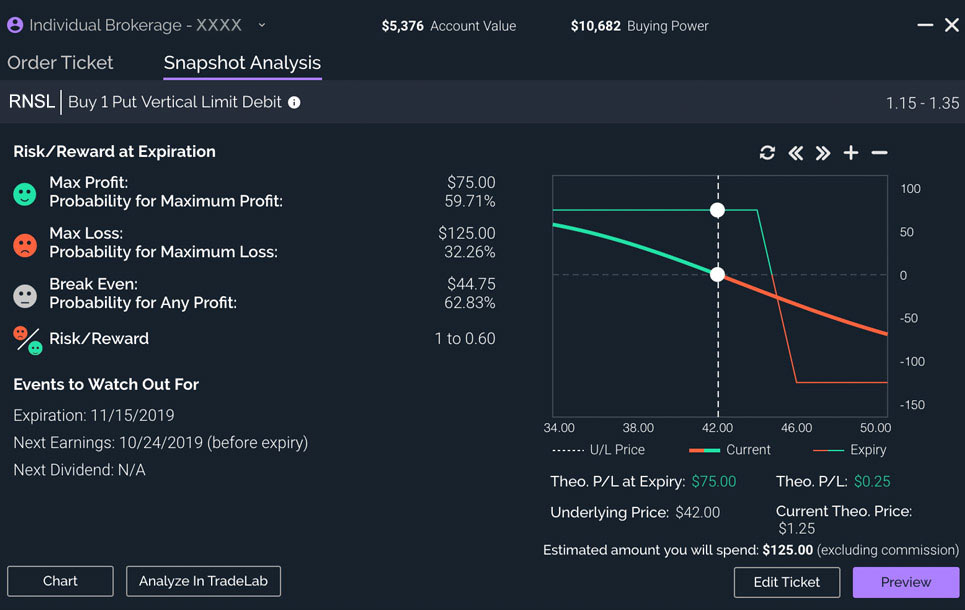
The current fee schedule lists $0 commissions for eligible online U.S.-listed stocks and ETFs. Standard options cost $0.65 per contract, or $0.50 for clients with at least 30 stock, ETF, or options trades per quarter. That threshold concerns trades, not simply contracts in a single order.
Qualifying buy-to-close options at $0.10 or less receive a contract-fee waiver through Dime Buyback. Check index surcharges, other applicable fees, and assisted-order charges separately.
Before choosing: test the web or app workflow you intend to use and read the cash-management terms. A stock execution statistic from a previous year is not a current guarantee or an options-speed benchmark.
5. Webull: low headline charges and fractional investing
Webull provides a distinct fifth brokerage choice instead of counting Schwab and TD Ameritrade twice. Its stock offering includes fractional shares and recurring investments for eligible securities, which may be relevant if you want to invest by dollar amount.
Its pricing schedule advertises zero commissions for eligible online U.S.-listed stocks, ETFs, and options. Options exceptions matter: certain index contracts cost $0.50 each, and oversized non-index option orders above 500 contracts incur a $0.10 per-contract fee. Applicable regulatory and exchange charges remain.
The options product page documents multi-leg tools, profit/loss diagrams, and paper trading. Those features are subject to account approval and product availability; they do not make an options strategy appropriate for every investor.
Before choosing: verify your required account registration, investment products, transfer process, and support channels. Low transaction charges do not compensate for a missing feature that is essential to your plan.
Compare the same account and activity
A useful comparison starts with a realistic workload. Someone buying an ETF each month has different requirements from someone managing options spreads or trading several currencies. Avoid declaring one broker universally best for both.
| Your priority | Compare directly |
|---|---|
| Regular investing | Eligible recurring purchases, fractional shares, chosen funds, and cash handling |
| Options trading | Permissions, contract costs, closing waivers, risk models, and supported order structures |
| Active stock trading | Quote coverage, order controls, actual fees, and execution evidence for comparable orders |
| International access | Exact markets, currencies, legal entity, conversions, and residence eligibility |
| Account administration | Statements, tax records, transfers, support, and beneficiary or ownership features |
Make the fee difference concrete
If ten option contracts are opened and later closed at $0.65 per contract on each side, the contract charge is $13. At $0.50 on each side, it is $10. The $3 difference excludes other fees and assumes no closing waiver.
A one-cent execution-price difference across ten standard 100-share contracts is $10. This does not identify which broker fills better; it shows why commissions are only one part of the comparison. Do not trade unnecessarily merely to qualify for a discount.
Verify account terms and protection
Read the firm’s Form CRS relationship summary and current account agreement. Distinguish a cash account from margin borrowing, and check the current rules for your planned activity rather than assuming every account has identical permissions or minimums.
Confirm the entity through FINRA BrokerCheck. SIPC protection addresses eligible missing cash and securities at a troubled member brokerage, subject to limits; it does not cover market losses. Bank sweep arrangements and other products have their own terms.
Review your results after choosing
A brokerage decision can be revisited as your needs change. Keep actual fills, fees, and notes so you can distinguish a weak market idea from an execution or workflow problem.
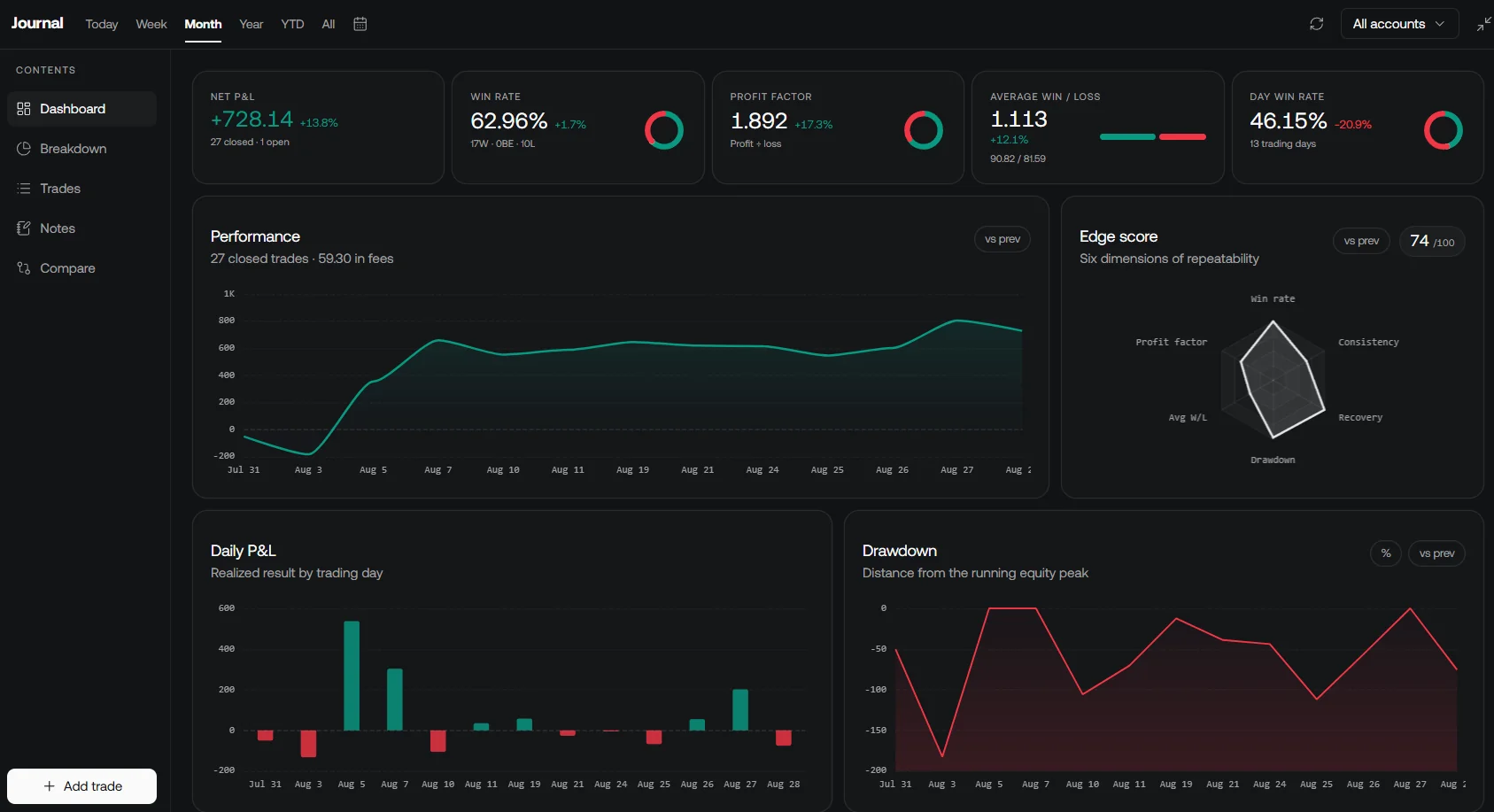
LuxAlgo’s Journal supports manual records, supported imports, and supported broker connections. Check compatibility with your broker and export format rather than assuming every account syncs automatically.
Video: an earlier zero-commission brokerage comparison
This Arvabelle video compares brokerage choices as they stood in 2023. It offers background on the questions investors ask, but its platform lineup, fees, and rankings are historical. Use the updated five-firm comparison and official sources above for current decisions.
Choose the account that supports your process
Shortlist firms that meet your essential account and product requirements, calculate costs for your expected activity, and test the controls before committing to a workflow. Use LuxAlgo’s native charts and Quant for structured research, and select the brokerage services that fit that process.
Read next