MotiveWave: Charting Platform Review
MotiveWave combines installed desktop charting, edition-specific technical analysis, and supported broker connections. LuxAlgo combines native browser charts with Quant, our coding agent, for developing editable indicators and strategies. MotiveWave is particularly relevant to traders who need its Elliott Wave tools, advanced DOM, or desktop optimizer. LuxAlgo is a strong choice for moving from chart analysis to a defined, testable idea in one workspace.
This review checks official product pages and documentation available September 8, 2026. Features vary by edition, data source, and device. A charting subscription, a market-data connection, and permission to place live orders are separate parts of the setup.
Quick Comparison
| Need | MotiveWave | LuxAlgo |
|---|---|---|
| Main environment | Desktop application for Windows, macOS, and Linux; separate iOS/Android companion | Native browser charting with Quant |
| Technical analysis | Fibonacci, Gann, harmonic drawings, studies, and edition-specific Elliott Wave tools | Native drawings and indicators, Orderflow tools, Library, and editable studies developed with Quant |
| Strategy testing | Pro/Ultimate optimizer with backtests, exhaustive/genetic optimization, and walk-forward analysis | Native strategy backtests developed with Quant against years of history |
| Broker workflow | Supported execution connections depend on edition, provider, account, and market | Research and simulated testing are distinct from separately configured alerts and broker routing |
| Free access | Community charting and simulation; no live trading | Free charts and 500 monthly credits for Quant, subject to plan limits |
| Purchase options | Monthly leases or one-time desktop licenses; data costs separate | Free plus Premium, Ultimate, and Ultra subscriptions; monthly and annual billing differ |
1. MotiveWave Platform Analysis
Charting and Technical Analysis
MotiveWave offers installed desktop charting with customizable layouts, linked charts, drawings, and studies. Its edition comparison lists at least 280 studies across desktop editions. Check the exact study or tool you need instead of assuming every edition contains the full advertised feature set.
Fibonacci tools measure retracements, extensions, and other relationships between chosen price points. Gann and harmonic tools—including Gartley patterns—provide additional geometric methods. Elliott Wave analysis organizes price swings into wave counts, while Hurst cycle tools investigate cyclical timing. These methods structure a hypothesis; a completed historical pattern does not establish that the same interpretation was obvious as it formed.
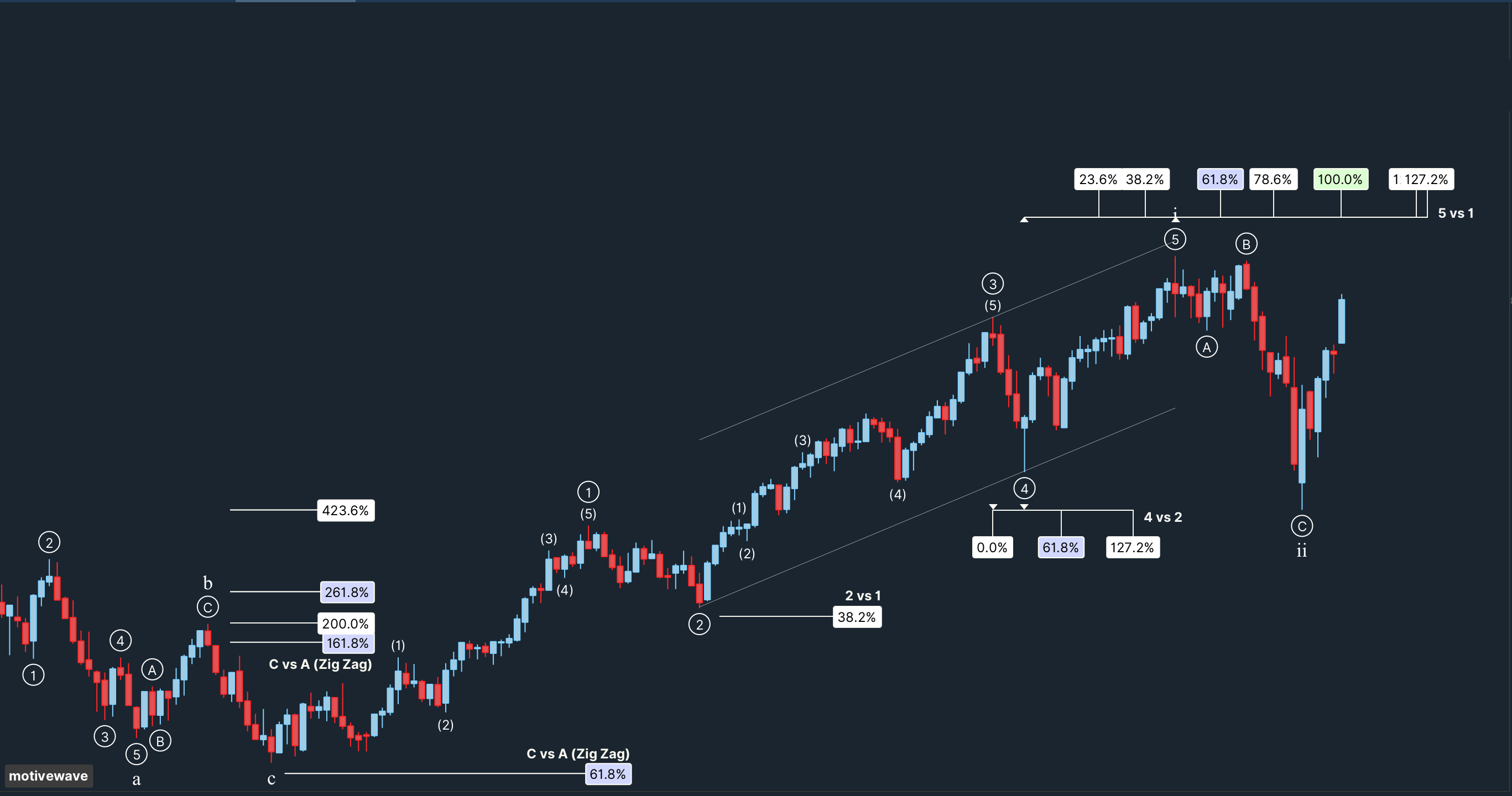
The edition boundaries matter: EW Lite and Ultimate include Elliott Wave tools; Pro does not. Ultimate adds the Elliott Wave scanner and Hurst cycles. Manual Fibonacci, harmonic, and Gann drawing tools are listed across desktop editions, while automatic harmonic analysis and the study scanner require Pro or Ultimate.
Order Entry, DOM, and Order Flow
Paid desktop editions add live trading through compatible connections. Depending on the configuration, orders can be entered from a chart or its price axis, the trade panel, or the Depth of Market (DOM). Community provides analysis and simulation rather than live trading.
Order Flow, Pro, and Ultimate include the advanced DOM, order-flow studies, TPO tools, and Trade Copier. A DOM represents available market-depth data; a footprint or Volume Imprint examines traded volume at price. They answer different questions, and neither should be described as revealing every participant’s intention.
Use the broker and data-feed directory and connection-details guide to check historical ticks, depth, server-side orders, and provider restrictions. MotiveWave advertises more than 30 combined broker and data-feed connections—not 30 interchangeable execution brokers. Provider availability and account entitlements need confirmation before purchase.
An installed application does not make live trading work offline. Market updates and new order routing require the relevant connections. Historical analysis or replay with available data is a different activity; do not rely on “offline access” as protection against an internet or broker outage.
Backtesting and Strategy Optimization
The Strategy Back Testing guide identifies this functionality as Professional/Ultimate. The optimizer supports three related tasks: a backtest with fixed settings, a search across parameter combinations, and walk-forward testing that advances through successive historical periods.
- Exhaustive optimization tests every combination within the ranges you specify. Larger searches can take substantially more time.
- Genetic optimization samples and refines candidate combinations. It can reduce the search workload but does not guarantee the best combination in the complete search space.
- Walk-forward analysis separates successive optimization and evaluation windows. It helps investigate stability but cannot remove selection bias or guarantee future results.
Configure the instruments, bar size, date range, commissions, and slippage. MotiveWave recommends historical tick data where available and documents generated ticks as an alternative when a provider lacks sufficient history. Generated ticks are an approximation, so do not treat their intrabar sequence as an observed market record. Review individual trades and execution assumptions, not just the optimizer’s highest return.
Custom Instruments, Alerts, and Java SDK
Pro and Ultimate support custom instruments, such as spreads, price ratios, or constructed indexes, alongside custom watchlist columns and multiple connections in one workspace. Lower editions list one broker/data-feed connection per workspace. A synthetic chart is an analysis instrument; verify separately whether and how its underlying legs can be traded.
MotiveWave also provides configurable alerts and a Java SDK. The SDK is listed across desktop editions, but that does not unlock every strategy or trading feature in Community. Developing a study, testing a strategy, and deploying orders each require the appropriate capabilities. Check alert delivery and connection requirements, including the behavior of your chosen notification channel.
Desktop and Mobile Access
Desktop installers support Windows, macOS, and Linux. The iOS and Android app complements the desktop product with phone and tablet layouts. Its current page lists CQG and Rithmic connections, four mobile editions, and edition-dependent features. Mobile Community is simulation-only, and mobile pricing is shown through the app stores.
The mobile guide identifies Market by Order and position-in-queue features as Rithmic-specific. Desktop connection coverage and optimizer capabilities should not be assumed to carry over to every mobile edition. Confirm the exact device, provider, data subscription, and tools you intend to use.
Getting Started With MotiveWave
This official MotiveWave Software webinar covers installation, workspaces, menus, charts, layouts, and instruments. It was published November 5, 2021, so use it for introductory orientation and consult the current documentation for pricing, editions, and interface changes.
2. LuxAlgo Platform Analysis
Native Charts and Quant
LuxAlgo charts provide a browser workspace for analysis, drawings, indicators, and strategy research. Quant helps develop editable indicators and strategies from your requirements. You can inspect the implementation and test changes on the chart without treating a prebuilt indicator as the limit of customization.
For a concrete comparison, consider a Fibonacci pullback idea. First define how a swing becomes confirmed, which retracement level matters, what confirms entry, and where the trade becomes invalid. Ask Quant to implement those rules, then review Code and Run and verify Inputs and Properties. An indicator drawing a level is not automatically a strategy simulating an order.
If a swing requires later bars for confirmation, the strategy must wait for those bars. It must not place historical trades as though the final swing label was known earlier. Include commission and slippage assumptions, inspect losing trades, and reserve a later period for evaluation. Native chart testing does not automatically reproduce MotiveWave’s Java code, genetic optimizer, feed, or live broker fills.
Drawings and Workspaces
The native drawing tools include lines, Fibonacci tools, patterns, measurements, and annotations. Drawings are anchored to time and price and saved with the workspace. Magnet snapping helps place anchors on OHLC values; the object tree manages visibility, locking, and removal.
The short demonstration below shows adding a Fibonacci drawing in LuxAlgo. It illustrates the manual chart workflow that can help clarify a rule before coding it. Drawing a retracement does not itself create a tested strategy.
Orderflow and Data Boundaries
LuxAlgo also provides native order-flow analysis. The data guide distinguishes candle history from pre-aggregated one-minute footprint data containing volume at price, buy/sell-side volume, and trade counts. Footprints are not a live order book or a complete raw trade tape.
Footprint data is available for supported crypto venues and U.S. equities through Cboe EDGX. EDGX is not consolidated U.S. market volume. Paid forex, commodities, and CME feeds supply candles rather than the same footprint coverage. Candle-based TPO, VWAP, and Visible Range Profile should not be confused with exchange depth or MotiveWave’s provider-dependent MBO display.
The Library
The Library holds hundreds of LuxAlgo tools, one click from a Quant Chart, including Pure Price Action Structures. Check the individual page for behavior, and backtest any of them with Quant; a historical result still needs review for market, timeframe, costs, and later-period performance.
Alerts and Broker Automation
A Quant strategy can fire strategy alerts once they are configured. Verify the trigger, delivery settings, and current plan entitlement.
Trade Relay is a separate, free, self-hosted open-source project for routing configured webhooks. Its current product page distinguishes the built-in simulator, Alpaca paper/live execution, Tradier sandbox, and watch-only accounts such as Interactive Brokers. Watch-only support is not order routing. Third-party services have their own supported brokers and requirements; the original blanket list of executable broker connections is not a reliable compatibility guide.
Pricing and Total Cost
MotiveWave Desktop Editions
| Edition | Monthly lease | One-time license | Key boundary |
|---|---|---|---|
| Community | Free | Free | Charting, studies, SDK, and simulation; no live trading |
| Standard | $24 | $245 | Live trading, advanced replay, cloud workspaces; no strategy optimizer |
| Order Flow | $49 | $595 | Order-flow studies, advanced DOM, and Trade Copier |
| EW Lite | $89 | $1,395 | Standard plus Elliott Wave tools; not the Order Flow package |
| Pro | $99 | $1,495 | Order Flow plus strategies, backtesting, multiple connections, and custom instruments |
| Ultimate | $159 | $2,295 | Pro plus advanced Elliott Wave, Elliott Wave scanner, and Hurst cycles |
These are the official one-month lease and one-time desktop prices checked for this review. Multi-month leases and installment options are also offered. Leases renew automatically and include ongoing updates/support. Regional taxes and broker or data-feed charges can add to the total.
A purchased license includes one year of updates and support. After that, you may keep the version available when coverage expired without renewing, but later updates and support require an optional extension. Current one-year extensions are $55 Standard, $105 Order Flow, $205 EW Lite, $225 Pro, and $295 Ultimate. A one-time license is therefore different from lifetime free updates.
MotiveWave advertises a 14-day Ultimate trial without a credit card. Use it to test the tools and connections you actually need. Do not assume trial access supplies all market data or that the same feature remains available in a lower paid edition.
LuxAlgo Monthly and Annual Plans
| Plan | Monthly billing | Annual total | Annual monthly equivalent |
|---|---|---|---|
| Free | $0 | $0 | $0 |
| Premium | $67.99 | $479.88 | $39.99 |
| Ultimate | $119.99 | $719.88 | $59.99 |
| Ultra | $229.99 | $1,439.88 | $119.99 |
These standard LuxAlgo prices exclude temporary promotions. Annual equivalents are not month-to-month prices. Monthly credits are 500 on Free, 5,000 on Premium, 25,000 on Ultimate, and 100,000 on Ultra. Check data, history, layout, and separate-product entitlements against the current plan table.
Compare the complete workflow rather than matching plan names. MotiveWave Standard at $24 does not include its optimizer; LuxAlgo Ultimate’s $59.99 figure requires annual billing. A desktop purchase, a monthly lease, and an annual LuxAlgo subscription involve different commitments. Review each provider’s current cancellation and refund terms rather than treating a trial and a money-back policy as equivalent.
Strengths, Limitations, and Platform Selection
- For active broker-connected trading, MotiveWave is relevant when your specific account and feed are supported. Test order controls, depth, data history, and disconnection behavior in simulation before relying on them.
- For Elliott Wave specialists, compare EW Lite with Ultimate. For advanced DOM and order flow without wave analysis, Order Flow or Pro may be more appropriate. The most expensive plan is not automatically necessary.
- For native chart research and custom indicator development, LuxAlgo offers a direct browser workflow with Quant, editable code, drawings, and strategy simulations. Keep the setup precise enough to test.
- For beginners, start with one market, one timeframe, and one clearly defined task. Both products provide documentation and education; neither removes the need to understand the method, data, and execution assumptions.
MotiveWave’s desktop installation, connection setup, Java development, and optimizer settings require time to learn. LuxAlgo reduces installation friction and supports conversational development, but generated code still needs review and native data/history limits still apply. Customization is more than adjusting indicator settings: MotiveWave exposes a Java SDK, while Quant supports editable indicator and strategy development in LuxAlgo.
For a multi-platform workflow, keep the same symbol, exchange, session, timeframe, and test period wherever possible. Differences in feeds, corporate-action adjustments, futures contracts, and simulated execution can change results. A setup that looks similar on two charts is not proof that their alerts or backtests are equivalent.
Choose MotiveWave when its specialist desktop analysis or supported execution connection solves a concrete requirement. Choose LuxAlgo when your priority is a native charting and AI research environment that helps turn an idea into inspectable code and a test. Evaluate the full process on a small, repeatable example before expanding the subscription or automation setup.
FAQs
Which MotiveWave editions include backtesting and Elliott Wave tools?
Strategy backtesting and optimization require Pro or Ultimate. Elliott Wave tools are included in EW Lite and Ultimate, while the Elliott Wave scanner and Hurst cycles require Ultimate. Pro does not include the Elliott Wave tools simply because it is above EW Lite in price.
Can MotiveWave trade offline or connect every desktop broker on mobile?
An installed desktop application does not provide live quotes or new broker order routing without the relevant connections. The mobile app has its own editions and currently lists CQG and Rithmic support. Check the exact device, provider, account, and data entitlement.
How does LuxAlgo compare with MotiveWave for custom strategies?
LuxAlgo provides native browser charts with Quant, our coding agent, to develop editable indicators and strategies that you review and run. MotiveWave offers a Java SDK and Pro/Ultimate strategy optimization. Their data, code environments, and simulation assumptions differ, and neither historical test guarantees live results.
References
- MotiveWave: desktop edition comparison
- MotiveWave: prices and update/support terms
- MotiveWave: backtesting and optimization guide
- MotiveWave: mobile editions and connections
- LuxAlgo: making strategies with Quant
- LuxAlgo: native strategy simulations
- LuxAlgo: data sources and limits
- LuxAlgo: open-source Trade Relay
- LuxAlgo: current plans
Read next